Sunday, April 19, 2009

M-Audio midi controllers and my rage

I'd say recently, but that's just not true. A few months ago I picked up my second M-Audio midi controller. Round one was the Oxygen 49 several years ago. I was familiar with the very strict rule of "thou shalt installith ALL software/drivers before thine plugs hardware into ones computering machine," and was very careful to follow all directions thoroughly and to the letter. Still, something happened and Lappy Tappy would not recognize any signals. Back it went.


[M-Audio Oxygen 49]


As a side note, I work in a pretty techy sort of industry. For a period of time I was installing and managing advanced relational database systems with no problem. I know how to perform geographically weighted regression, use agent based modeling to predict land use change; however, I cannot get a simple USB device to work properly. I can't imagine why Alesis, M-Audio, etc. all continue to provide such shitty, fakucta, and just terrible software support for great pieces of hardware.

Anyway, I picked up my second M-Audio device: the Axiom 25. I figured that it was different enough from the Oxygen so that any remaining drivers/keys left in my registry would not interfere with the operation of this. (Also, these companies are terrible about leaving their grubby cheeto hands all over my computer. An uninstall should NOT leave registry keys for me to trip over later)


[M-Audio Axiom 25]

Of course a fresh install of the most recent drivers, downloaded directly from the M-Audio site did not work. I set this rather rad looking unit to the side and concentrated on school like a good kid.

The problem is that after installing the keyboard, Windows claims that "New hardware is ready to use." Subsequent connections, however claim that a "New" audio device is found. This shouldn't be new...

Also, Fruity Loops, Acid, Reason, Ableton, Midi-Ox, etc. do not recognize any input device as being present. Here's the trick:


  • Install the updated drivers from the M-Audio web site
  • Plug in and turn on the keyboard
  • Open the Device Manager
    - Right click on My Computer and choose Properties
    - Choose the Hardware tab
    - Click the Device Manager button
  • Expand "Sound, video and game controllers"
  • Right click on the generic USB Audio Device, and choose Properties
  • Select the Driver tab
  • Click Update Driver
  • Choose "No, not at this time" to let Windows fix it and click Next
  • Choose "Install from a list or specific location" and click Next
  • Choose "Don't Search. I will choose the driver to install." and click Next
  • A) In the Model box, choose "Axiom 25 USB" Driver if it is available
  • B) Choose "Have Disk"
    - Choose Browse
    - Navigate to the location of the downloaded driver, i.e. C:\Program Files\M-Audio\M-Audio Series II MIDI
  • A second driver should attempt to update itself. Repeat the previous few steps for the "Axiom 25 USB MIDI Driver" as well.
This worked for me. The device appeared in all MIDI controlling software packages.

Thanks to rorschach76 @ http://forums.m-audio.com/showthread.php?t=334 for the method

Saturday, April 18, 2009

Working with .tar files and imagery

When downloading imagery (Landsat, IKONOS, ASTER, SRTM, etc) I continually encounter the .tar extension/format of compressed datasets. 7-zip is a great (light and free) package to use.


7-zip.org


Select all .tar files in the directory to be extracted, right click, and choose "Extract Here" from the 7-Zip menu:


[Click to enlarge]


Newer versions of WinZip have .tar support as well, though this utility is pretty quick and efficient.


These are a few of the resources I have been using to obtain remote sensing imagery:
Global Land Cover Facility (Free)
http://glcf.umiacs.umd.edu/data

USGS Landsat Web Site (Free now)
http://landsat.usgs.gov

NASA Earth Sci Grad Student Fellowship Program for RS
http://nspires.nasaprs.com

Wednesday, April 1, 2009

Campus Golf


View Larger Map


Rules:
Paved/concrete/brick surfaces are treated as an out-of-bounds hazard; the ball should be moved to the grass for the next shot. No shot may be taken from paved surfaces. Don't ruin the nice brick walkways

Mulch, pine needles, short shrub/bushes, and flower beds are out of bounds. The ball must be dropped in closest grass area. Do not take a shot from these areas either

Cover your divots

Free drops if shot is too close or blocked by bushes/walls/etc

People listening to pods or riding bikes or skate boards are hole-ending hazards

Thursday, February 26, 2009

Spatial Filters are Neat


[Click to enlarge]

A Hydrothermal Composite Enhancement produces a multi-colored, multi-band image that is composed of three ratioed bands of Landsat TM imagery (MIR[1.55μ-1.75μ]/MIR[2.08μ-2.35μ], Red/Blue, and NIR/Red). This image highlights both hydrographic temperature spikes across the area of interest as well as sources of thermal contribution, such as beaches and urban land cover.

Monday, February 23, 2009

The Velociraptor Projection, AKA the "Raptogram"

Raptogram Projection

The Raptographic Combined Hyperpseudocylindriconic Projection has a false easting and northing are applied to adjust the planimetric origin to be located 120 miles (190km) off the western coast of Costa Rica, over the raptor pit on Isla Nublar. This is an appropriate projection for the shallow southeastern portion of the Cocos tectonic plate; the bathymetry of which looks very much like the profile of a calculating and hungry velociraptor (Search Google Maps for the coordinates 5.534001, -87.065021 / see map inset below).

This projection minimizes distortion and preserves distance along each parallel, however both distance and direction are significantly skewed beyond its boundaries suggesting that velociraptors exhibit an advanced sense of geographic comprehension, however they are largely unconcerned with the world beyond their own... for now.

[Bathymetry appears to resemble a hidden raptor: View Larger Map]

Wednesday, January 14, 2009

Password Protect Your VB Project

I've wanted to password protect the code of my first project using VB and ArcObjects, and again the examples I found were not what I was looking to use. Here is a very simple way to limit access to Microsoft Visual Basic code in Excel and ArcMap.
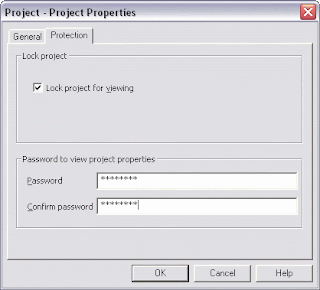
  • From the Microsoft Visual Basic project window, choose
    Tools :: Project Properties
  • Choose the Protection tab
  • Check the box to "Lock project for viewing," set a password, and hit OK.


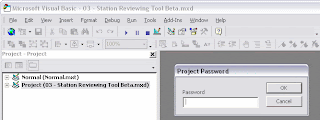
Once the project is closed (or another/new project is opened) and reloaded, viewing or editing any code will be restricted until the password is entered. Full access is granted for the remainder of the time that the project is loaded.


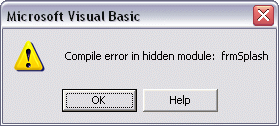
The code is even restricted during an error.


Friday, December 26, 2008

Spyware Guard 2008 - You just blew my mind!

(Uninstall / removal process half way down in bold)
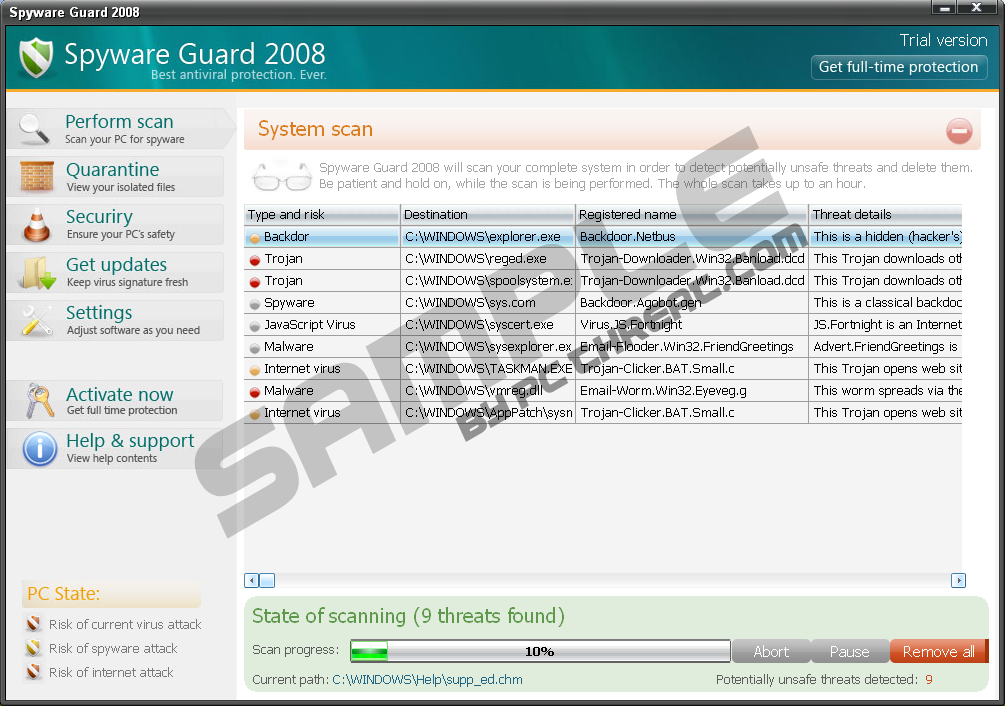
I got a sort of virus, but not really. It's this super clever malware / extortionware that F'ed up my computer out of nowhere. It pretends to be spyware removal software - and it does a damn good job of looking legit. If it were not so brazen by popping up every two minutes and running its "scans" over and over, I might have even ignored it. However, it was bogging down my memory, my internets connection, limited access to many Web sites, and was just annoying.

It automatically installs itself without any pop-ups or lame trickery like that. It then runs or (pretends to run) scans of the hard drive for other spyware. It pulls up a list of all the infected files and franticly urges the user to purchase the full version to get rid of it all. On top of this generic front, there is a program called Windows Security Center (winscenter.exe) that looks very much like a real Microsoft program, which tells you that the virus software is running, the firewall is fine, but then it says in red that Spywareguard 2008 needs to be upgraded immediately. Doubtful at best. There's also a blurb at the bottom that mentions something to the effect of "Microsoft puts your privacy first," which is screaming "bullshit." Microsoft doesn't need to attest to it's privacy policy on any of its interfaces.

Further, Spyware Guard 2008 blocks access to certain web sites - specifically spyware removal software, virus scan/protection, or sites with keywords like "Remove" and "Spyware Guard." When attempting to view these sites, I kept getting "Connection failed" messages, or I was forwarded to some weird unique IP address. This limits the ability to not only download new tools, but it also hinders the updating of my current Ad-Aware / Spybot programs.

All of this is enraging me, of course, though I'm also intrigued at the chutzpah and brilliance of this idea and how well it's pulled off! I can't believe that the people behind it aren't caught and shut down because they're asking for money out in the open! That's serious fortitude right there.

How to get rid of Spyware Guard 2008 / Spywareguard 2008:
There is a good technical review of what is included in this infection at Wiki-Security.com:
http://www.wiki-security.com/wiki/Parasite/SpywareGuard2008

The main problem is that when you delete the folder C:\Program Files\Spyware Guard 2008\, it is automatically restored. The same thing happens with C:\Windows\System32\winscenter.exe. Don't even bother with the uninstall file. Since these know when the file is missing, the next best thing to do is to break the executable files. This won't solve the problem, but it will at least stop the programs from opening and bogging down your memory.
  • Open Notepad, and Open a document
  • From the "Files of type:" pull down menu, choose "All Files"
  • Navigate to C:\Program Files\Spyware Guard 2008
  • Open Spywareguard.exe
  • This will be machine language so don't expect to be able to decipher anything. Start from the top and start removing a few lines of code at a time. I took around a dozzen or so lines at a time scattered throughout the very top, and very bottom of the document and that worked well. Every time you hit delete or backspace, be sure to save. Don't remove everything; the point is to break the file, not remove it entirely.
  • Do the same thing to C:\Windows\System32. Now you won't be bothered by the programs as much, but every two minuts or so, a command prompt/MS-DOS window (attempting to launch spywareguard.exe) would VERY briefly open and close itself. Additionally, my internet access was slow and many sites were blocked.
  • Next, download and install SpyHunter Spyware Detection Tool. This is free to install and scan, but it will not remove anything until you buy the full version, HOWEVER when installing, it recognizes that other malware is attempting to inhibit its processes and effectivly stops it! Now turn to freeware!
  • Download and install the latest version of Malwarebytes' Anti-Malware. This software is free to scan and remove infections, and upgrades are around $25. The free version kicked Spyware Guard 2008 to the curb. Be careful not to remove EVERYTHING it finds, because it found some Ad-Aware files that were safe.
  • You're done! Go ahead and update your AVG, Ad-Aware, etc.
Spyware Guard 2008 is very a very clever idea. A professional, sleek design makes it look serious, but it's a major headache and everybody I talked to recommended reformatting, though this method worked very well for me.


(Click to enlarge)

(Update)
How to get rid of Spyware if you already have Malwarebytes:
I returned home from the holidays to find that my roommate had contracted the same problem, however he had Malwarebytes installed on his machine already.
  • Start Windows in Safe Mode (At startup / when you power up the computer, tap the F8 key eight times or until the Windows Advanced Options Menu appears, and select "Safe Mode" from the top of the menu.)
  • Run Malwarebytes' Anti-Malware program from here. This scan took around three hours to complete.
That's it. I have not attempted (nor do I plan) to run any older versions/updates of Malwarebytes in this situation, though it has been highly recommended by several IT professionals. If an older version of Malwarebytes does not cure the situation, I would default to uninstalling Malwarebytes and running the first method using an updated version of the software. Download.com may assist in this download if Spywareguard inhibits your access the official site directly.